Command/setuplayout
\setuplayout
Contents
Syntax (autogenerated)
| \setuplayout[...][...=...,...] | |
| [...] | name |
| state | start stop normal repeat |
| margin | dimension |
| edge | dimension |
| margindistance | dimension |
| edgedistance | dimension |
| leftedgedistance | dimension |
| rightedgedistance | dimension |
| leftmargindistance | dimension |
| rightmargindistance | dimension |
| topdistance | dimension |
| headerdistance | dimension |
| footerdistance | dimension |
| bottomdistance | dimension |
| preset | name |
| leftmargin | dimension |
| rightmargin | dimension |
| leftedge | dimension |
| rightedge | dimension |
| header | dimension |
| footer | dimension |
| top | dimension |
| bottom | dimension |
| backspace | dimension |
| topspace | dimension |
| setups | name |
| cutspace | dimension |
| width | dimension middle fit |
| bottomspace | dimension |
| lines | number |
| height | dimension middle fit |
| horoffset | dimension |
| veroffset | dimension |
| columns | number |
| columndistance | dimension |
| method | default normal name |
| location | left middle right top bottom singlesided doublesided |
| textwidth | dimension |
| textheight | dimension |
| nx | number |
| ny | number |
| dx | dimension |
| dy | dimension |
| scale | number |
| sx | number |
| sy | number |
| marking | on off page empty color one two four |
| grid | yes no off |
| textdistance | dimension |
| alternative | default normal makeup name |
| clipoffset | dimension |
| cropoffset | dimension auto |
| trimoffset | dimension |
| bleedoffset | dimension |
| artoffset | dimension |
| direction | normal reverse |
| \setuplayout[...] | |
| [...] | reset name |
Description
Horizontal
If the document is singlesided, then the 'outside' is the right side and the 'inside' is the left side.
The width parameter sets \makeupwidth, the width of the text area.
width=middlesolves the following equation to set the makeupwidth:
paperwidth = \backspace + \makeupwidth + \cutspace
backspaceis the distance from the inside edge of the paper to the edge of the text area.cutspaceis the width from the outside edge of the text area to the edge of the paper. If cutspace is set to 0, it is taken to be equal to the backspace.
- if
width=fit, then the calculation is like forwidth=middle, but with the following additions:leftmargin/rightmargin=> width of leftmargin/rightmargin areamargin=> width of outer marginleftedge/rightedge=> width of leftedge/rightedge area*distance(like leftmargindistance) => space separates * area from the innerhoroffsetis applied after the various width calculations to shift everything bodily to the outside.
Comment
A picture of a page with each of these layout parameters indicated is shown in Layout.
You can use the \showframe macro to see the results of your layout. Just put the command before the \starttext and lines will be drawn on your document showing the different areas.
Grid Setups
In MkIV, at least, a number of presets for the grid parameter were defined using \definegridsnapping; they can be invoked by e.g. \setuplayout[grid=normal]. The presets are all combinations of the following options:
none |
don't enlarge |
halfline |
enlarge by halfline/halfline |
line |
enlarge by line/line |
strut |
enlarge by ht/dp (default) |
first |
align to top line |
last |
align to bottom line |
mindepth |
round depth down |
maxdepth |
round depth up |
minheight |
round height down |
maxheight |
round height up |
local |
use local interline space |
shift:-3tp |
vertical shift within box |
These are the presets and their definitions.
| \definegridsnapping[normal] | [maxheight,maxdepth,strut] |
| \definegridsnapping[standard] | [maxheight,maxdepth,strut] |
| \definegridsnapping[yes] | [maxheight,maxdepth,strut] |
| \definegridsnapping[strict] | [\v!maxdepth:0.8,maxheight:0.8,strut] |
| \definegridsnapping[tolerant] | [\v!maxdepth:1.2,maxheight:1.2,strut] |
| \definegridsnapping[top] | [minheight,maxdepth,strut] |
| \definegridsnapping[bottom] | [maxheight,mindepth,strut] |
| \definegridsnapping[both] | [minheight,mindepth,strut] |
| \definegridsnapping[broad] | [maxheight,maxdepth,strut,0.8] |
| \definegridsnapping[fit] | [maxheight,maxdepth,strut,1.2] |
| \definegridsnapping[first] | [first] |
| \definegridsnapping[last] | [last] |
| \definegridsnapping[high] | [minheight,maxdepth,none] |
| \definegridsnapping[low] | [maxheight,mindepth,none] |
| \definegridsnapping[line] | [line] |
| \definegridsnapping[strut] | [strut] |
| \definegridsnapping[max] | [maxdepth,maxheight,strut] |
| \definegridsnapping[min] | [mindepth,minheight,strut] |
Pseudo columns
With the columns and columndistance parameters you can set up a design grid that is usually not visible and not related to real columns, but you can use it for placements on Layers. See the Details manual.
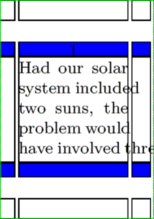
Example
\setuppapersize[A10]

%% This is an example for showing the effect of the vertical parameters
%% top, topdistance, bottom, bottomdistance and topspace.
%% Just play around with these parameters.

\showframe

%% Show the top and the bottom with blue color:
\setupbackgrounds[header, footer][background=color, backgroundcolor=blue]

\def\MyLength{10pt}

\setuplayout[
  top=\MyLength,
  topdistance=\MyLength,
  bottom=\MyLength,
  bottomdistance=\MyLength,
  topspace=\dimexpr(\topheight + \topdistance),
  height=fit]

\starttext
    \input thuan
\stoptext
See also
- Layout
- \adaptlayout to locally adapt the page layout
- \setuppapersize to set the paper size
- Paper setup section for the predefined paper sizes and Paper sizes for theirs actuals dimensions in mm.
Help from ConTeXt-Mailinglist/Forum
All issues with:

