Headers and Footers
Contents
Headers with centered content
ConTeXt offers the possibility to have mirrored headers (for odd and even pages); content can be in two parts, at the inner and outer margin of each page. But how do you get a header that will have one part of its content centered and one part in the outer margin? (This is a common setup for books: chapter title centered, page number in outer margin.) Hans posted this solution to the list:
\setuppagenumbering[alternative=doublesided]

\setupheadertexts[]
\setupheadertexts[\setups{text a}][][][\setups{text b}]

\startsetups[text a]
  \rlap{\pagenumber}
  \hfill
  \getmarking[chapter]
  \hfill
  \llap{whatever}
\stopsetups

\startsetups[text b]
  \rlap{whatever}
  \hfill
  \getmarking[section]
  \hfill
  \llap{\pagenumber}
\stopsetups
The use of the TeX macros \rlap and \llap allows centering of content. Note that \pagenumber gets you the number prior to conversion; if you're using \setupuserpagenumber[numberconversion=...] then you'll want to use \userpagenumber instead.
Using capitals
In the previous example, the chapter title and the section title were fetched with the macro \getmarking which wraps around \fetchmark. However, in case you need a raw version of the mark, say for instance to put it uppercase, you may use this setup instead:
\startsetups[text a]
  \rlap{\pagenumber}
  \hfill
  \expanded{\uppercase{\fetchmark[chapter][first]}}
  \hfill
  \llap{whatever}
\stopsetups

\startsetups[text b]
  \rlap{whatever}
  \hfill
  \expanded{\uppercase{\fetchmark[section][first]}}
  \hfill
  \llap{\pagenumber}
\stopsetups
You can replace \uppercase by \WORD and so on.
Marginal headings and centered headings
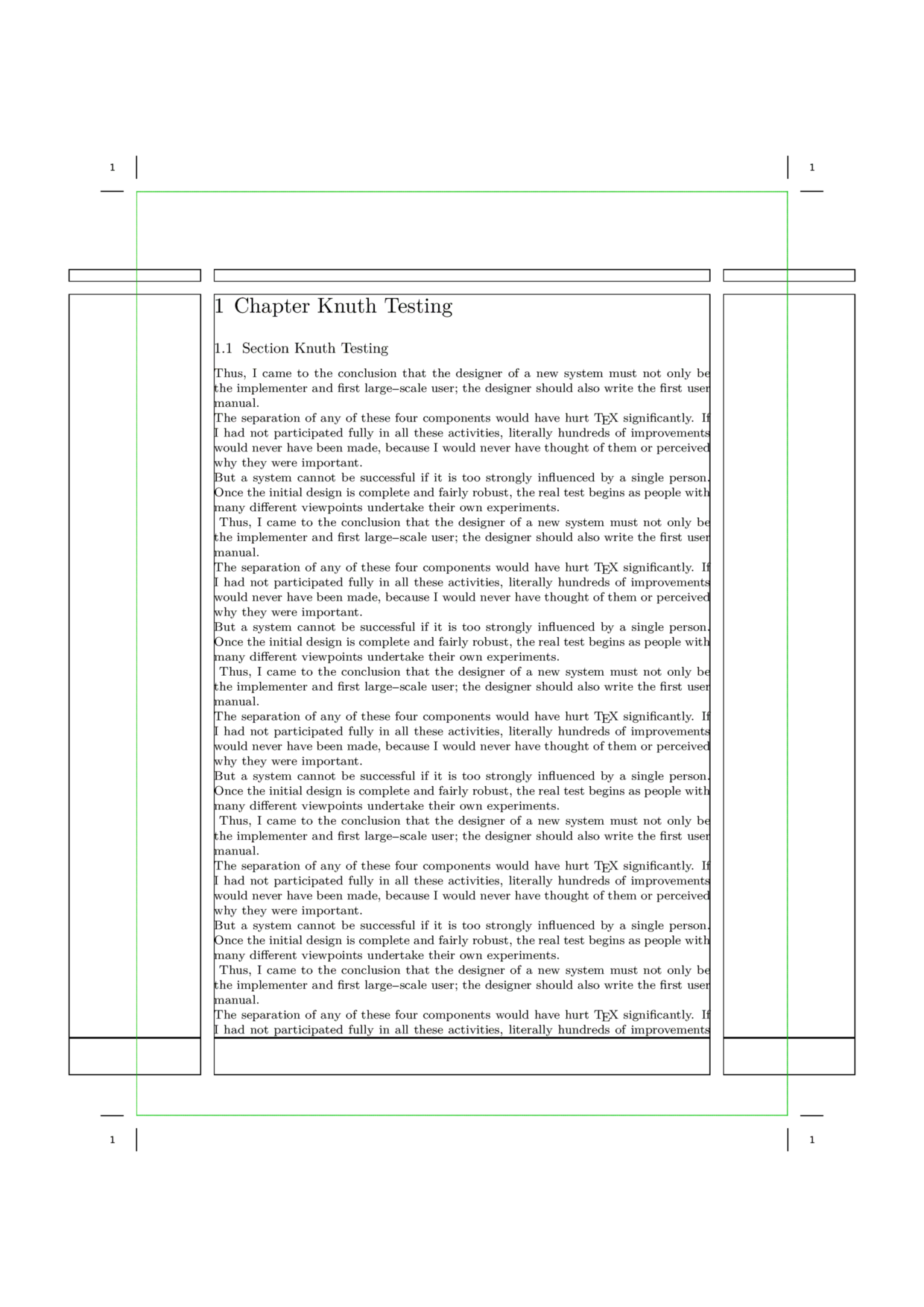
The following file gives a way to achieve marginal and centered headings for doublesided documents. Experiment to achieve other effects!
% output=pdf interface=en

\setuppapersize [A5][A4]

\newdimen\Margin
\Margin=3cm

\newdimen\MarginRaise
\MarginRaise=56ex

\setuplayout[width=middle,
             height=middle,
             footer=3\bodyfontsize,
             header=\bodyfontsize,
             headerdistance=\bodyfontsize,
             bottom=3\bodyfontsize,
             location={middle,doublesided},
             margin=\Margin,
             marking=on]

\setuppagenumbering[alternative=doublesided,
                    location={footer,middle}]

\setuptexttexts[margin][][\setups{text a}][\setups{text b}][]
\setuptext[style=\tf,state=high]

\startsetups[text a]
\raise\MarginRaise\hbox{\vtop{\hsize=\Margin%
  \startalignment[right]
  \getmarking[chapter]
  \stopalignment
}}
\stopsetups

\startsetups[text b]
\raise\MarginRaise\hbox{\vtop{\hsize=\Margin%
  \startalignment[left]
  \getmarking[section]
  \stopalignment
}}
\stopsetups

\setupbottomtexts[pagenumber]
\setupbottom[style=\tf,state=high]

\setupfootertexts%
[][\setups{text c}][\setups{text d}][]
\setupfooter[style=\tf,
               state=high]

\startsetups[text c]
  \midaligned{\raise2\bodyfontsize\hbox{\getmarking[chapter]}}
\stopsetups

\startsetups[text d]
  \midaligned{\raise2\bodyfontsize\hbox{\getmarking[section]}}
\stopsetups

\setupinmargin[align=inner,
               style=\tfx\setupinterlinespace]

\showframe

\starttext

\chapter{Chapter Knuth Testing}

\section{Section Knuth Testing}
\dorecurse{20}{\input knuth\par\ }

\stoptext
You can suppress or bypass a header or footer on a chapter page like this:
% with header=high the text area of the page will extend up
% into the space where the header normaly sits
\setuphead[chapter][header=high,footer=none]

% header=empty leaves the header area intact,
% but does not fill it with any text
\setuphead[chapter][header=empty,footer=none]
Works only if the head title starts a new page. Since section does not do this by default, then you must write
\setuphead[section][page=yes,header=high,footer=none]
The options for 'header=' and 'footer=' are none,empty,high,nomarking.
Substituting a shorter lemma for a section header
Given a global setup such as
\setupheadertexts%
[][section][chapter][]
Sometimes the section title is too long to fit in the header. Instead of manually inserting a new \setupheadertexts comamnd you may use something like
\startsection
   [title={Here is a section title too long to fit in the header},
    marking={Here is a section title}]
Similarly, you can send shorter lemmas to the table of contents or to bookmarks. So the relevant keys include
title marking list bookmark
Examples
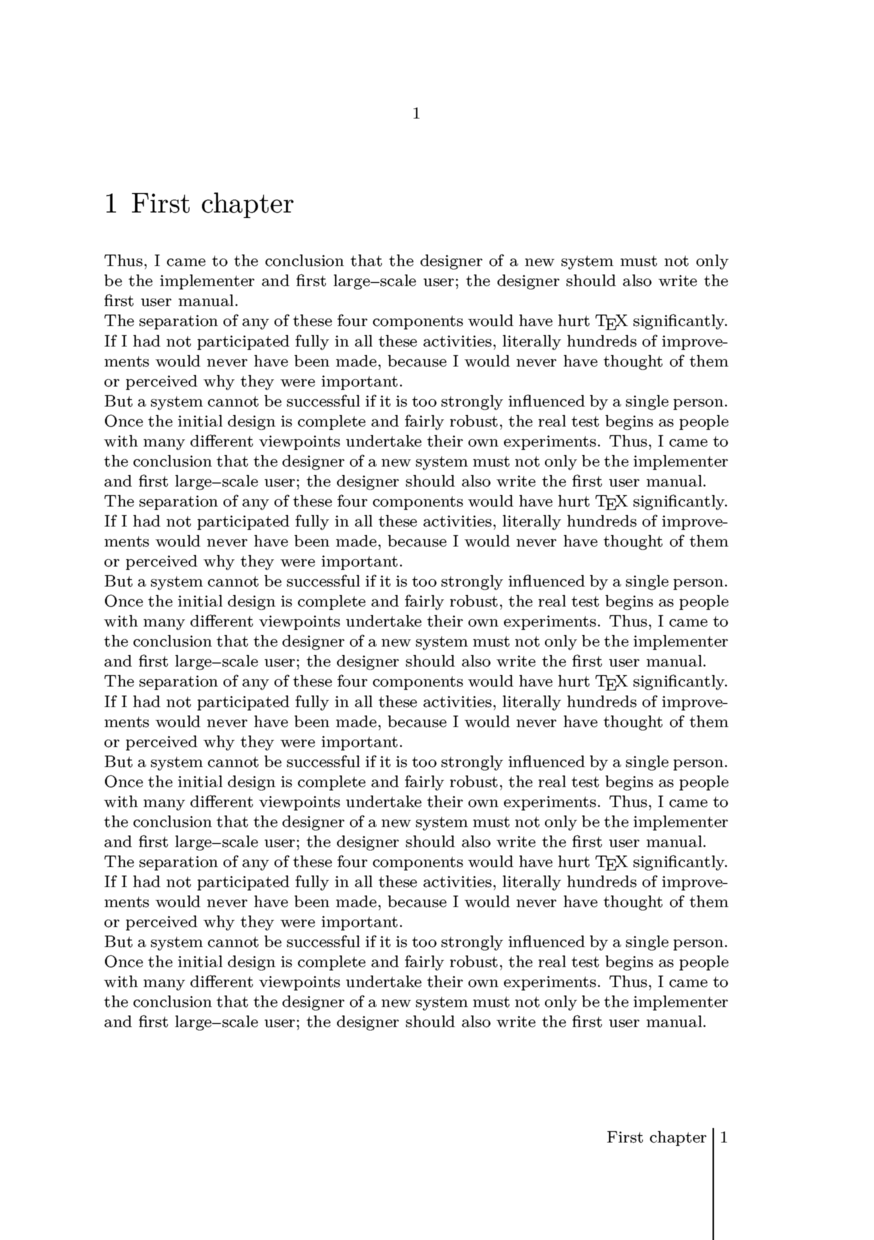
Nice classic design
\startsetups [footer:leftpage]
     \prefixedpagenumber
     \space
     \undepthed{\blackrule
         [
             width=\linewidth,
             height=\strutht,
             depth=\dimexpr\footerheight+\bottomspace\relax,
         ]}
     \space
     \labeltext{chapter} \getmarking[chapternumber]
\stopsetups

\startsetups [footer:rightpage]
     \getmarking[chapter]
     \space
     \undepthed{\blackrule
         [
             width=\linewidth,
             height=\strutht,
             depth=\dimexpr\footerheight+\bottomspace\relax,
         ]}
     \space
     \prefixedpagenumber
\stopsetups

\setuplabeltext
     [en]
     [chapter=Chapter]

\setuphead
     [chapter]
     [bodypartlabel=]

\setupfootertexts
     [] [\directsetup{footer:rightpage}]
     [\directsetup{footer:leftpage}] []

\setuppagenumbering
     [alternative=doublesided]

\starttext

\startchapter [title=First chapter]
     \dorecurse{10}{\input knuth}
\stopchapter

\startchapter [title=Second chapter]
     \dorecurse{10}{\input knuth}
\stopchapter

\stoptext